Introduction to Errand AI Task Automation
Errand AI is a personal task automation platform. You describe what you need done in plain language, and an AI agent takes care of it — researching topics, drafting emails, browsing the web, managing files, interacting with APIs, and much more. It runs on your own hardware, keeping your data under your control.
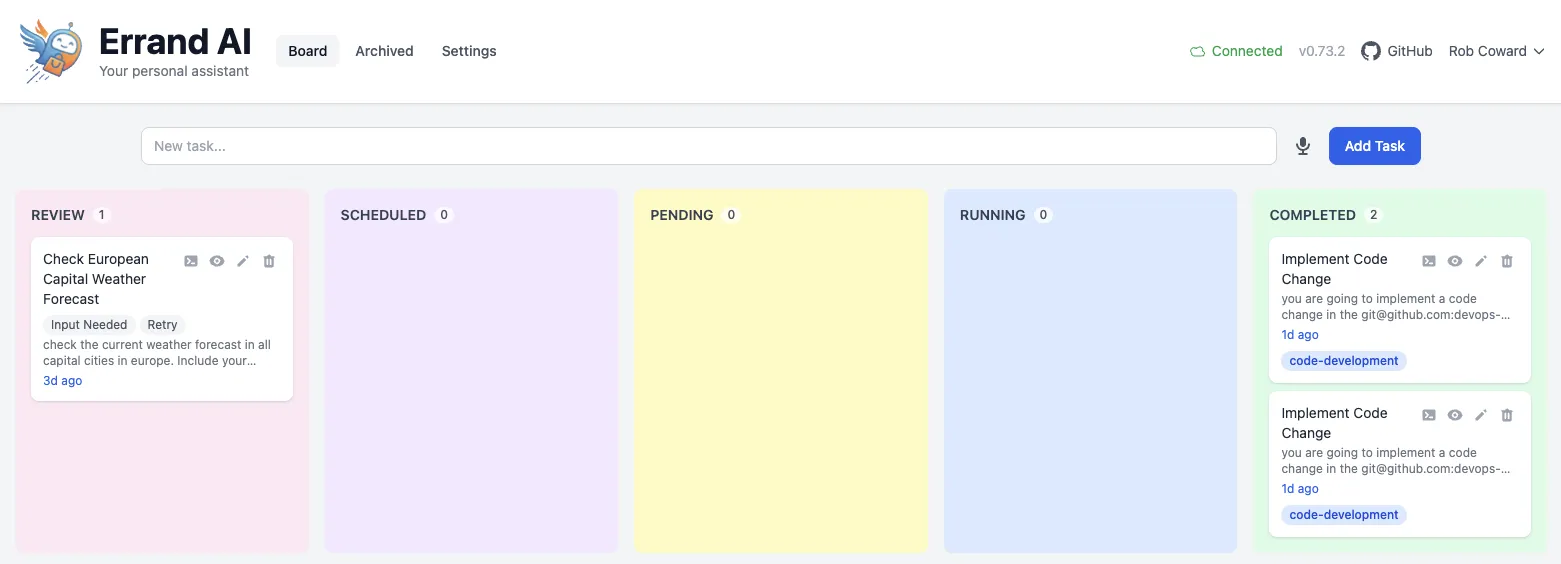
How It Works
Section titled “How It Works”You give Errand a task. An AI agent picks it up, works through it step by step in an isolated container, and delivers the result. You can watch the agent’s progress in real time, answer follow-up questions if it needs clarification, and schedule tasks to run later or on a repeating basis.
Behind the scenes, Errand is a task scheduler with AI workers. Tasks flow through a simple lifecycle:
Pending → Running → Completed (or Review if the agent needs your input)
Each task runs in its own ephemeral sandbox — a fresh container that is created for the task and destroyed when it is done. There is no shared state between tasks, no persistent sessions, and no way for one task to interfere with another. You control exactly which tools and integrations each task can access.
Many Ways to Create Tasks
Section titled “Many Ways to Create Tasks”One of Errand’s strengths is that you are not limited to a single interface. Tasks can come from anywhere:
Web UI
Section titled “Web UI”The task board is the primary interface for most users. Create tasks by typing a description, or use voice transcription to speak your task and have it converted to text automatically. The board gives you a visual overview of all your tasks across their lifecycle stages, with real-time streaming of the agent’s reasoning and tool usage as it works.
With the Slack integration, you can create and manage tasks without leaving
your workspace. Use /task new research competitor pricing to fire off a task, @mention the Errand bot in a
channel to turn a conversation into a task, or check on progress with /task status. Results are delivered back
to Slack as they complete.
MCP Server
Section titled “MCP Server”Errand exposes a Model Context Protocol server that any AI-capable tool can connect to. This is what makes Errand AI-native — not just a tool for humans to manage AI, but a platform that other AI agents can use too.
Connect your IDE (Claude Code, Cursor, Windsurf) or any MCP-compatible agent to Errand’s /mcp/ endpoint, and it
can create tasks, check status, read results, and orchestrate multi-step workflows programmatically. Your coding
assistant can delegate long-running research to Errand while you keep working, or a custom agent can use Errand as
its task execution backend.
Agents Creating Tasks
Section titled “Agents Creating Tasks”When an Errand agent is working on a task, it can create new tasks itself using the built-in new_task tool. This
enables delegation chains — a complex task can spawn sub-tasks that run in parallel, each in their own isolated
container. The originating agent can check on progress and combine the results.
What Can It Do?
Section titled “What Can It Do?”Errand agents have access to a configurable set of tools through MCP servers. Out of the box, agents can:
- Search the web and synthesize information from multiple sources
- Send, read, and manage emails through your connected email account
- Browse websites using a full headless browser with Playwright
- Access cloud files from Google Drive and OneDrive
- Interact with GitHub — read repositories, create issues, review code
- Post to social media and manage communications
- Remember context across tasks using persistent AI memory
You can extend this further by adding your own MCP servers or connecting additional integrations.
Runs on Your Hardware
Section titled “Runs on Your Hardware”Errand is designed to run on infrastructure you control:
- A Mac using the Errand Desktop app (the simplest option — one download and you’re running)
- A home server or personal computer using Docker Compose
- A Kubernetes cluster for team deployments with Helm charts
Container images are available for both x86_64 and ARM64, so Errand runs on everything from a Raspberry Pi to a multi-node production cluster.
Your tasks, credentials, and data stay on your machine. Nothing is sent to external services unless you explicitly configure an integration that requires it (like connecting an email account or an LLM provider).
Remote Access
Section titled “Remote Access”Since Errand runs locally, it’s only accessible from your network by default. The optional Errand Cloud subscription gives you secure remote access from anywhere, plus webhook relay for integrations like Slack that need a public endpoint. Your data passes through but is never stored on the cloud service.
Next Steps
Section titled “Next Steps”- Install Errand — Get started with macOS, Docker, or Kubernetes
- Configure your AI model — Connect to an LLM provider
- Set up integrations — Connect email, Slack, GitHub, and more
- Understand the architecture — See how the components fit together