Errand Service
The worker is the component that turns your tasks into action. When you create a task in Errand, the worker picks it up, spins up an isolated container to run it, streams logs back in real time, and collects the result. Everything happens automatically — you just watch the progress from the task board.
How the Worker Fits In
Section titled “How the Worker Fits In”Errand has three main components:
- Server — The API and web interface you interact with
- Worker — The background process that executes tasks (this page)
- Task Runner — A lightweight container image that runs inside the worker’s containers, providing the AI agent with tools and a sandboxed environment
The worker runs as a separate process (or pod, in Kubernetes) alongside the server. It connects to the same database and message bus, but its only job is executing tasks.
Task Lifecycle
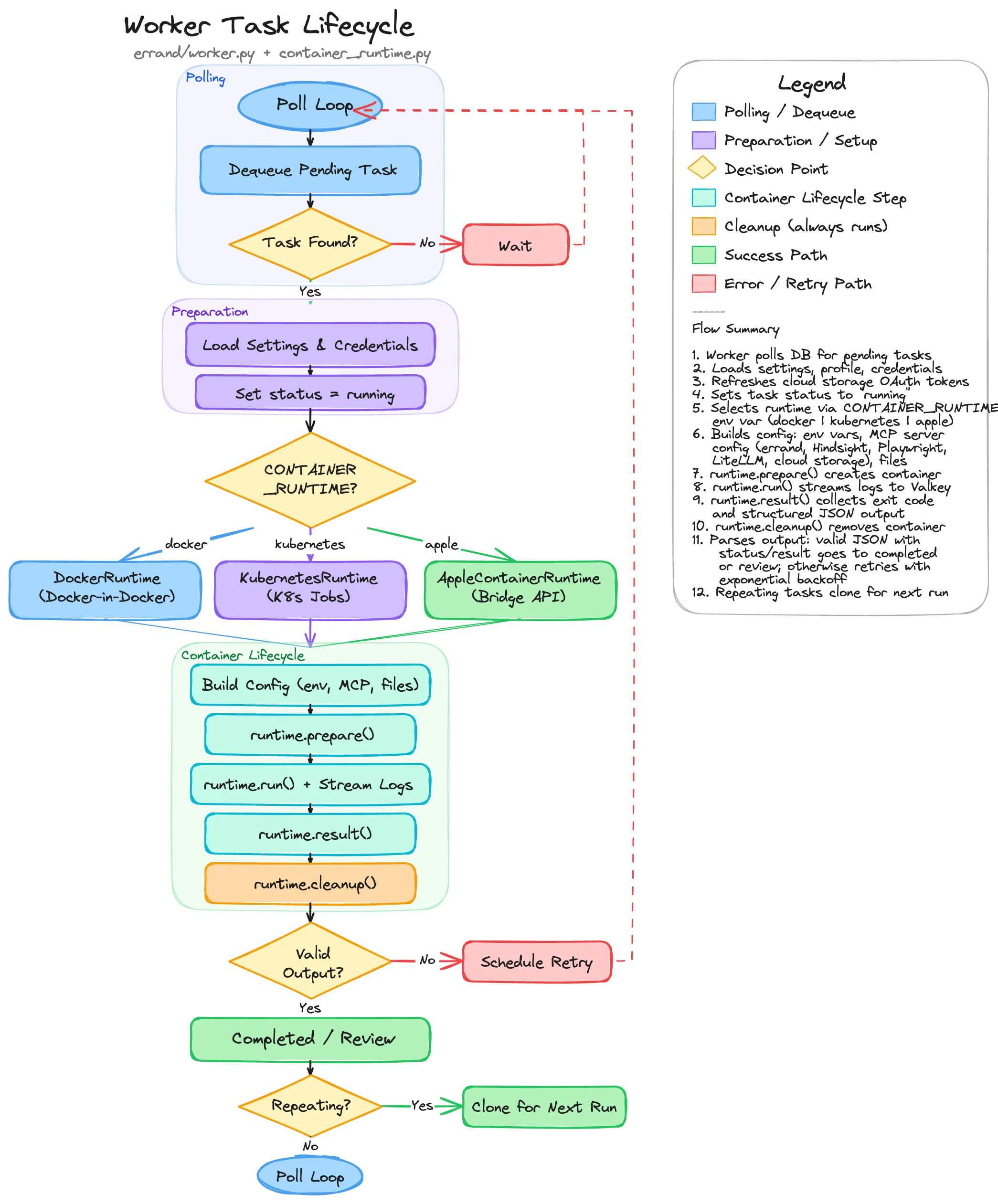
Section titled “Task Lifecycle”When a task moves to the Pending column on your task board, the worker picks it up and carries it through a well-defined lifecycle.
1. Polling and Dequeue
Section titled “1. Polling and Dequeue”The worker continuously polls the database for pending tasks. When it finds one, it locks the row (using
SELECT ... FOR UPDATE SKIP LOCKED so multiple workers don’t grab the same task) and begins processing.
If no tasks are available, the worker sleeps briefly before checking again.
2. Preparation
Section titled “2. Preparation”Before launching a container, the worker gathers everything the task-runner will need:
- Settings — The global configuration (AI model, system prompt, MCP servers, credentials)
- Task Profile — If the task matches a profile, the profile’s overrides are applied (different model, custom system prompt, restricted tools, etc.)
- Platform Credentials — GitHub tokens, cloud storage OAuth tokens, and other integration credentials are loaded from the database
- Token Refresh — Cloud storage tokens (Google Drive, OneDrive) are checked for expiry and refreshed if needed before being injected into the container
Once preparation is complete, the task status changes to Running and a real-time update is pushed to the UI.
3. Container Runtime Selection
Section titled “3. Container Runtime Selection”The worker supports three container runtimes, selected by the CONTAINER_RUNTIME environment variable:
| Runtime | Value | Used By | How It Works |
|---|---|---|---|
| Docker | docker | Local development, Docker Compose | Creates containers via the Docker SDK inside a Docker-in-Docker sidecar |
| Kubernetes | kubernetes | Production clusters | Creates Kubernetes Jobs with ConfigMaps for input and emptyDir volumes for output |
| Apple | apple | Errand Desktop (macOS) | Delegates to the desktop app’s bridge API, which uses Apple’s Containerization framework |
All three runtimes implement the same interface — prepare(), run(), result(), cleanup() — so the rest of
the worker code doesn’t need to know which runtime is in use.
4. Building the Container Configuration
Section titled “4. Building the Container Configuration”The worker assembles three files that are injected into every task-runner container:
prompt.txt— The task description, exactly as you wrote itsystem_prompt.txt— The system prompt, enriched with recalled memories from Hindsight, skill manifests, cloud storage instructions, and repo context discovery guidancemcp.json— The MCP server configuration, defining which tools the agent can use
The MCP configuration is built dynamically based on what’s available and what the task’s profile allows:
- Errand MCP — Always injected (provides tools like
new_task,post_tweet,send_email) - Hindsight — Injected if a Hindsight memory server is configured (provides
retain,recall,reflect) - Playwright — Injected if the Playwright sidecar is healthy (provides browser automation)
- LiteLLM — Injected if LiteLLM MCP servers are enabled (provides access to additional AI models)
- Cloud Storage — Injected if the user has connected Google Drive or OneDrive and valid tokens exist
- User-configured servers — Any custom MCP servers you’ve added in settings
Environment variables (API keys, model selection, max turns, reasoning effort) and optional SSH credentials for Git access are also prepared at this stage.
5. Running the Task
Section titled “5. Running the Task”The container is created via runtime.prepare() and then started with runtime.run(). During execution:
- Log streaming — Every log line from the task-runner is published to Valkey (Redis) in real time, which the server relays to your browser via Server-Sent Events. You see the agent’s reasoning, tool calls, and progress as it happens.
- Heartbeat updates — The worker periodically updates a heartbeat timestamp in the database. If the worker crashes mid-task, this heartbeat allows another worker (or the same worker after restart) to detect orphaned tasks and recover them.
- Callback token refresh — A one-time token stored in Valkey allows the task-runner to push its result back to the server. The token’s TTL is refreshed periodically for long-running tasks.
6. Collecting the Result
Section titled “6. Collecting the Result”When the container exits, the worker collects the result through two channels:
- Callback result — The task-runner can push its structured JSON output directly to the server via an internal API endpoint. This is the preferred path because it doesn’t depend on parsing container logs.
- Container stdout — As a fallback, the worker reads the container’s stdout and looks for a JSON object
containing
statusandresultfields.
The structured output includes:
status— Eithercompleted(task finished successfully) orneeds_input(the agent has questions for you)result— The agent’s response textquestions— Optional list of questions if the agent needs clarification
7. Output Handling
Section titled “7. Output Handling”Based on the result, the task moves to one of three destinations:
- Completed — Valid output with
status: "completed". The task moves to the Completed column. If it’s a repeating task, a clone is created for the next scheduled run. - Review — Valid output with
status: "needs_input". The task moves to the Review column with the agent’s questions displayed. You can provide answers and send it back for another round. - Retry — No valid structured output, or the container exited with an error. The task is moved back to Scheduled with exponential backoff (1 minute, 2 minutes, 4 minutes, etc.) and a “Retry” tag is added. After 5 failed attempts, the task moves to Review for manual inspection.
8. Cleanup
Section titled “8. Cleanup”Regardless of the outcome, runtime.cleanup() always runs. This removes the container (Docker), deletes the Job
and ConfigMap (Kubernetes), or calls the bridge API’s delete endpoint (Apple). In Docker mode, the Playwright
sidecar container is also cleaned up.
Orphan Recovery
Section titled “Orphan Recovery”If a worker crashes while a task is running, the task would be stuck in the “running” state forever. To handle this, when a worker starts up it scans for orphaned Kubernetes Jobs (or Docker containers) left behind by a previous instance:
- If the associated task is still marked as “running” in the database and has retries remaining, it’s moved back to Scheduled with backoff
- If retries are exhausted, it’s moved to Review with a note explaining what happened
- The orphaned container resources are cleaned up
This ensures no task is permanently lost, even if the infrastructure has issues.
Scaling
Section titled “Scaling”In Kubernetes deployments, you can run multiple worker replicas. The SKIP LOCKED query ensures each worker picks
up different tasks, so they naturally load-balance without coordination. Each worker independently manages its own
containers and log streams.