Task Management
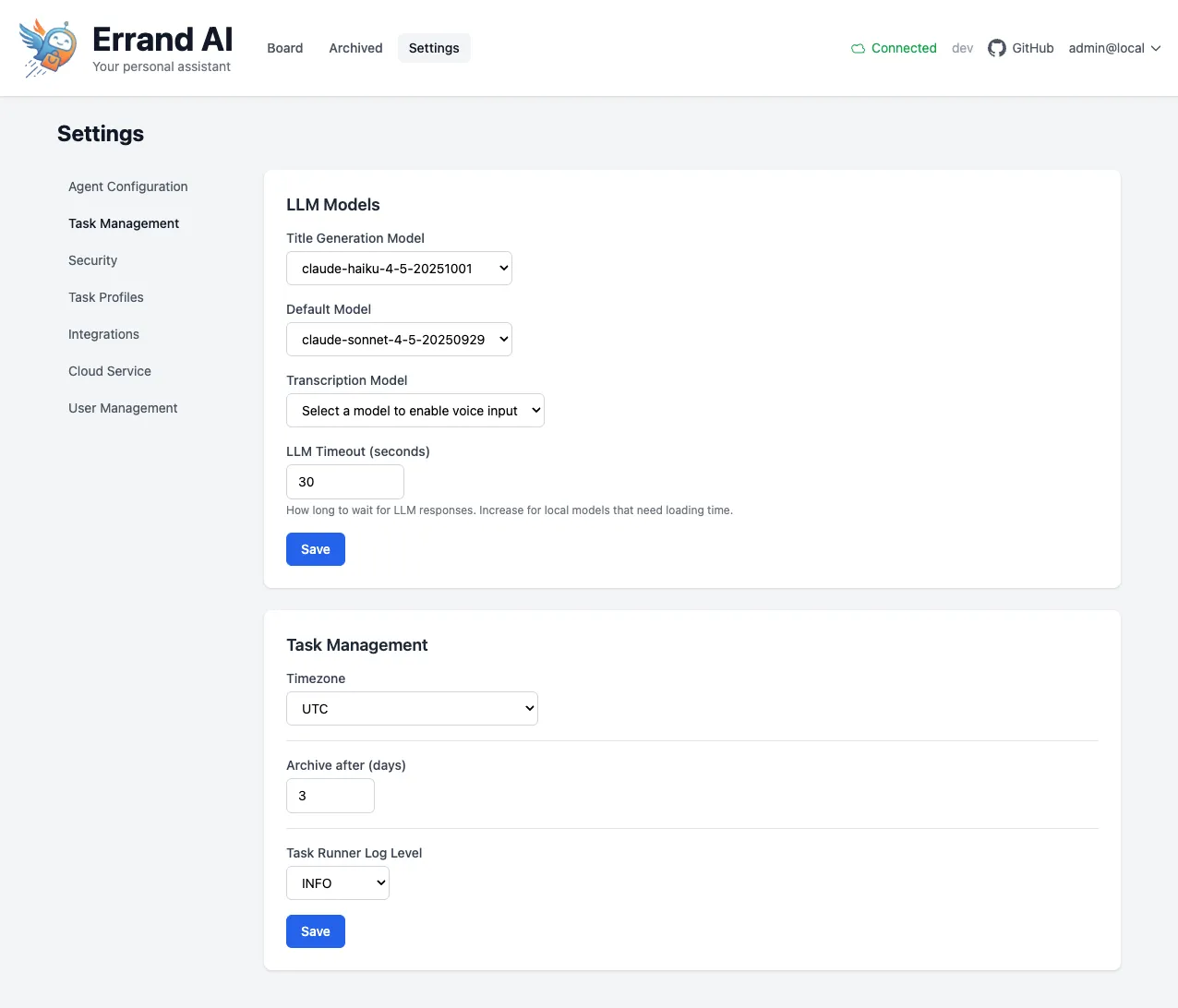
The Task Management page controls how tasks are processed, which AI models are used, and how scheduling works. You can find it under Settings > Task Management.
LLM Models
Section titled “LLM Models”This section lets you choose which AI models Errand uses for different purposes. For guidance on which models to select and what providers are available, see the AI Models guide.
Title Generation Model
Section titled “Title Generation Model”The model used to automatically generate short, descriptive titles for your tasks. A lighter, faster model is
recommended here since title generation is a simple task. For example, claude-haiku works well for this purpose.
Default Model
Section titled “Default Model”This is the main model that agents use when executing tasks. Choose a model that balances capability with speed for
your typical workload. For example, claude-sonnet is a good general-purpose choice.
Transcription Model
Section titled “Transcription Model”If you want to create tasks using your voice, select a Whisper-compatible transcription model here. Once configured, Errand will accept audio input and automatically transcribe it into a task description.
Leave this blank if you do not plan to use voice input.
LLM Timeout
Section titled “LLM Timeout”The number of seconds Errand will wait for a response from the AI model before timing out. The default is 30 seconds, which works well for cloud-hosted models.
If you are running models locally (for example, through Ollama), you may need to increase this value to give the model extra time to load into memory and generate a response. A value of 120 seconds or more is recommended for local models.
Task Management
Section titled “Task Management”This section controls general task processing behavior.
Timezone
Section titled “Timezone”Set your local timezone so that scheduled tasks run at the correct time. This is especially important if you use Errand’s scheduling features to run tasks at specific times of day.
Archive After (Days)
Section titled “Archive After (Days)”Completed tasks are automatically moved to the archive after this many days. The default is 3 days. Archived tasks are still accessible but are kept out of your main task list to reduce clutter.
Increase this value if you like to keep completed tasks visible for longer, or decrease it if you prefer a cleaner task list.
Task Runner Log Level
Section titled “Task Runner Log Level”Controls how detailed the agent’s execution logs are. The available levels are:
- INFO — Standard logging. Shows key steps and results. This is the default and is recommended for most users.
- DEBUG — Verbose logging. Shows detailed internal operations. Useful for troubleshooting issues.
- WARNING — Only shows warnings and errors.
- ERROR — Only shows errors.
If you are ever troubleshooting a task that is not behaving as expected, temporarily switching to DEBUG can help you understand what the agent is doing at each step.