AI Models
Errand uses AI models to do its work — reading your task descriptions, reasoning about what needs to be done, calling tools, and producing results. The models you choose have a direct impact on the quality of the work Errand produces, how fast it responds, and how much it costs to run.
You do not need to be an AI expert to make good choices here. This guide will walk you through what matters and help you pick the right models for your setup.
How Errand Uses Models
Section titled “How Errand Uses Models”Errand does not use a single model for everything. Different parts of the system have different needs, so you configure a model for each purpose:
Agent Model (Default Model)
Section titled “Agent Model (Default Model)”This is the most important choice. The agent model powers the main task execution loop — it reads your instructions, decides what to do, calls tools (like web search, email, or file access), and produces the final result. This model needs to be capable of complex, multi-step reasoning and reliable tool use.
Minimum recommended tier: Balanced (see Choosing the Right Models for details).
Title Generation Model
Section titled “Title Generation Model”When you create a task, Errand automatically generates a short, descriptive title. This is a simple summarisation job that even lightweight models handle well.
Recommended tier: Efficient.
Hindsight Memory Model
Section titled “Hindsight Memory Model”Hindsight is Errand’s memory system. It uses an AI model to understand, store, and retrieve knowledge across tasks. The model needs good language comprehension, but it does not need the advanced reasoning capabilities required by the agent.
Recommended tier: Efficient to Balanced.
Transcription Model (Optional)
Section titled “Transcription Model (Optional)”If you want to create tasks using your voice, Errand can transcribe audio input into text. This requires a Whisper-compatible model. Leave this unconfigured if you do not plan to use voice input.
You can also assign different models to specific types of work using Task Profiles. For example, you might use a more powerful model for research tasks and a faster one for quick replies.
Quick-Start Recommendations
Section titled “Quick-Start Recommendations”If you just want to get started, here are our recommendations:
| Purpose | Recommended Tier | Example Models |
|---|---|---|
| Agent (Default) | Balanced | Claude Sonnet 4, GPT-4o, Gemini 2.5 Flash |
| Title Generation | Efficient | Claude Haiku 4.5, GPT-4o Mini, Gemini 2.0 Flash |
| Hindsight Memory | Efficient | Claude Haiku 4.5, GPT-4o Mini, Gemini 2.0 Flash |
| Transcription | Whisper | whisper-large-v3 (cloud or local) |
These are starting points. For a deeper understanding of what each tier means and how to choose, see Choosing the Right Models.
LiteLLM — Your Model Gateway
Section titled “LiteLLM — Your Model Gateway”We strongly recommend using LiteLLM as a proxy between Errand and your model providers. LiteLLM provides a single, unified API that works with virtually every LLM provider — cloud services, local models, and everything in between. Both Errand and Hindsight connect to your models through LiteLLM.
Why Use LiteLLM?
Section titled “Why Use LiteLLM?”- One interface for everything. Configure your providers and API keys in LiteLLM once, and both Errand and Hindsight can use any model you have set up. No need to manage credentials in multiple places.
- Switch providers without reconfiguring Errand. Want to try a different model or provider? Change it in LiteLLM and Errand picks it up automatically.
- Spend tracking and budgets. Monitor how much you are spending on AI across all providers in one dashboard.
- Rate limiting and fallbacks. Protect yourself from unexpected costs, and automatically fall back to an alternative model if your primary one is unavailable.
- Guardrails. Add safety checks and content filtering at the proxy level.
How It Works
Section titled “How It Works”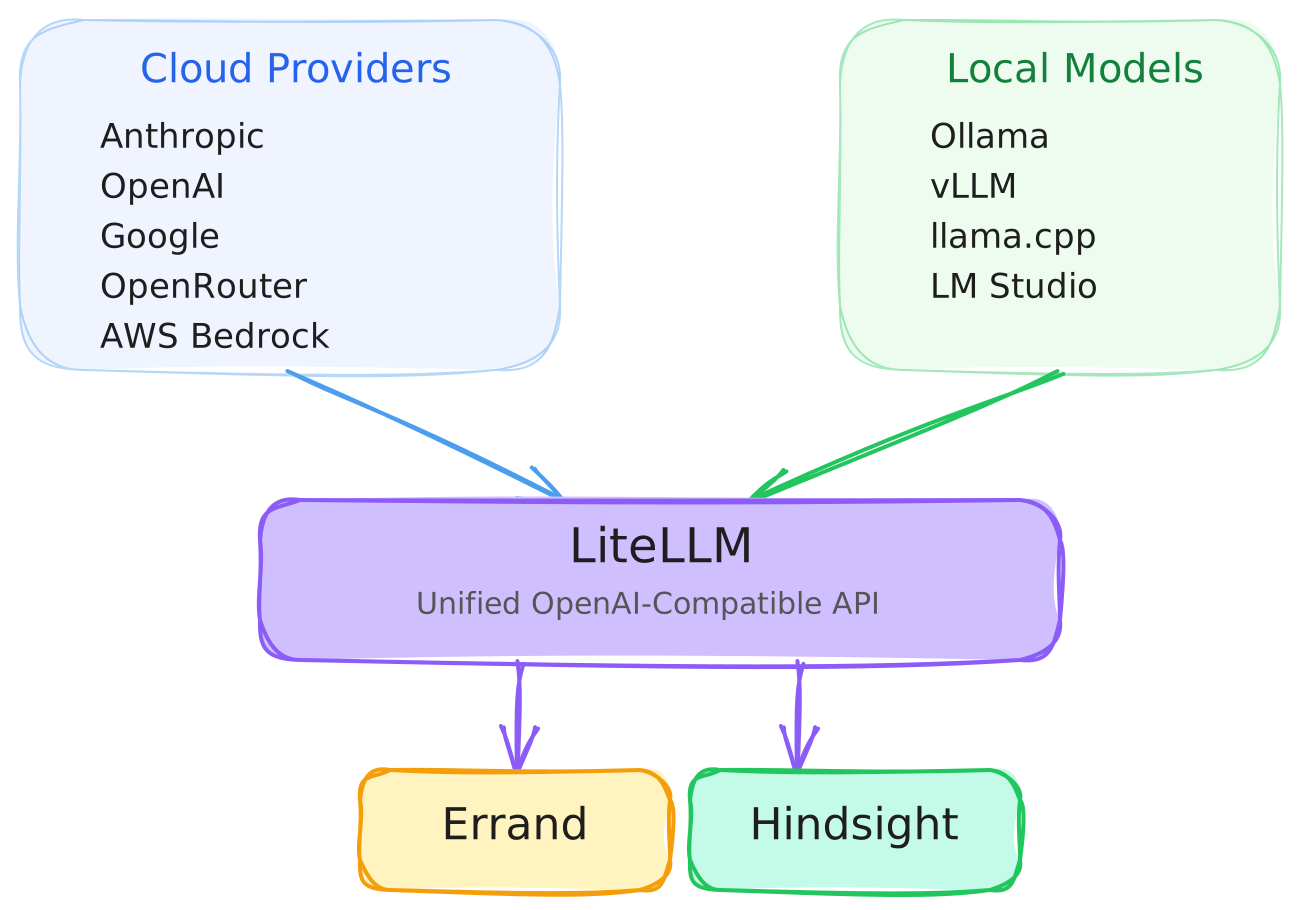
Getting Started with LiteLLM
Section titled “Getting Started with LiteLLM”If you are using Errand Desktop, LiteLLM is included automatically. The setup process will guide you through adding your provider credentials and selecting models before configuring the rest of the system.
For Docker Compose and Kubernetes deployments, LiteLLM is included in the default configuration. See the Docker installation guide or Kubernetes installation guide for setup instructions.
While LiteLLM is optional — Errand will work with any OpenAI-compatible endpoint — we recommend it for all deployments. The operational benefits are significant, especially as your usage grows.
LiteLLM is open source and completely free to use.
Going Deeper
Section titled “Going Deeper”- Choosing the Right Models — Understand the capability tiers, what each model slot needs, and how to make trade-offs between quality, speed, and cost.
- LLM Providers — A guide to the major cloud providers, aggregator services, and how to choose between them.
- Running Models Locally — Set up Ollama, vLLM, or other local model servers for privacy, cost savings, or offline use.