Architecture Overview
Errand is built as a set of loosely-coupled components that work together to turn your natural language instructions into completed work. This page explains what each component does and how they interact.
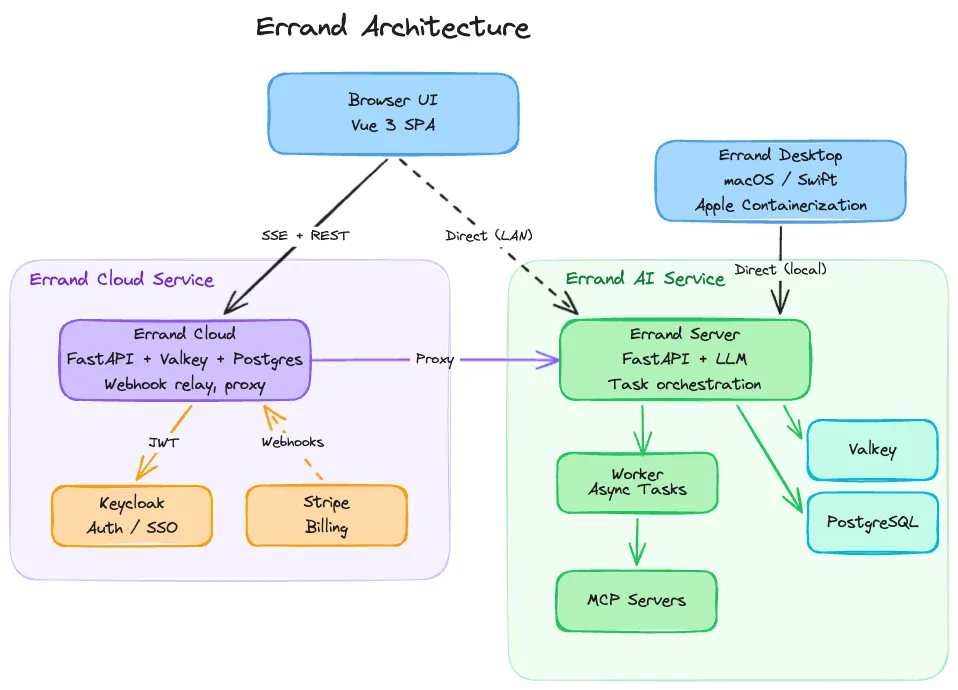
Components at a Glance
Section titled “Components at a Glance”| Component | Role |
|---|---|
| Errand Server | FastAPI application — serves the web UI, REST API, and coordinates everything |
| Worker | Background process that picks up tasks and runs them in isolated containers |
| Task Runner | Ephemeral container image that provides the AI agent with a sandboxed environment and tools |
| MCP Servers | Tool servers (Model Context Protocol) that give agents access to email, web search, task management, and more |
| Valkey | In-memory message bus for real-time log streaming and pub/sub events |
| PostgreSQL | Persistent storage for tasks, settings, credentials, and user data |
| Errand Cloud | Optional hosted service for secure remote access and webhook relay |
| Errand Desktop | macOS application that manages the full installation using Apple Containerization |
Errand Server
Section titled “Errand Server”The server is the central hub. It runs as a single FastAPI application that handles multiple responsibilities:
- Web UI — Serves the Vue 3 single-page application that you interact with in your browser. The frontend communicates with the server over REST and Server-Sent Events (SSE) for real-time updates.
- Task orchestration — Manages the task lifecycle: receiving new tasks, assigning them to workers, tracking status, and delivering results back to the UI.
- Authentication — Handles user login via Keycloak OIDC (single sign-on), issuing and validating JWT tokens.
- MCP endpoint — Exposes a built-in MCP server at
/mcp/that agents (and external tools) use to interact with Errand’s capabilities. - Integration APIs — OAuth flows for cloud storage, webhook endpoints for Slack, and credential management for all connected platforms.
The server does not execute tasks itself — it delegates that to the worker.
Worker and Task Runner
Section titled “Worker and Task Runner”The worker is a separate process that runs the same codebase as the server but with a different entrypoint. Its job is straightforward: poll the database for pending tasks, launch a container for each one, stream logs back in real time, and collect the result.
For each task, the worker spins up an ephemeral task runner container. This is a lightweight image containing an AI agent (powered by the configured LLM) and a set of tools available via MCP. The container receives:
- A prompt file with your task description
- A system prompt with instructions, recalled memories, and skill definitions
- An MCP configuration file defining which tool servers the agent can use
- Environment variables for API keys, model selection, and other settings
The task runner executes the agent loop — reasoning, calling tools, and producing a structured result — then exits. The worker collects the output and updates the task status. The container is destroyed immediately after, leaving no persistent state behind. This isolation means each task starts clean, with no risk of one task’s data leaking into another.
For a detailed walkthrough of the task lifecycle, see the Worker Process page.
Container Runtimes
Section titled “Container Runtimes”The worker supports three container runtimes, selected by environment configuration:
- Docker — Used for local development and Docker Compose deployments. Containers run inside a Docker-in-Docker sidecar.
- Kubernetes — Used for production clusters. Each task becomes a Kubernetes Job with its own Pod, ConfigMap, and volumes.
- Apple Containerization — Used by Errand Desktop on macOS. The worker delegates container management to the desktop app via a local bridge API, which uses Apple’s native virtualization framework.
All three runtimes implement the same interface, so the rest of the system doesn’t need to know which one is in use.
LLM Integration
Section titled “LLM Integration”Errand doesn’t bundle its own AI model. Instead, it connects to an external LLM endpoint using the OpenAI-compatible API format. This gives you flexibility in choosing which model to use and where it runs. See the AI Models guide for help choosing the right models and providers.
A common setup is to use LiteLLM as a proxy in front of one or more model providers.
LiteLLM presents a unified OpenAI-compatible API and lets you route requests to different backends — OpenAI, Anthropic,
local models via Ollama, or any other provider — without changing your Errand configuration. You just set the
OPENAI_BASE_URL to point at your LiteLLM instance and configure the model name in Errand’s settings.
The worker injects the LLM endpoint and API key into every task runner container, so agents always know where to send their requests.
If LiteLLM is configured with MCP server support, Errand can also inject a LiteLLM MCP gateway into the agent’s tool configuration, giving the agent access to additional tools hosted behind LiteLLM.
MCP Servers
Section titled “MCP Servers”MCP (Model Context Protocol) is an open standard for connecting AI agents to tools. Errand uses MCP extensively — both as a provider and a consumer of tools.
Built-in MCP Server
Section titled “Built-in MCP Server”Errand’s server exposes an MCP endpoint at /mcp/ that provides tools for:
- Creating and managing tasks (
new_task,task_status,list_tasks) - Sending and reading emails
- Searching the web
- Posting to social media
This server is automatically injected into every task runner, so agents can always interact with Errand itself. But it’s not limited to internal use — any MCP-compatible client on your network can connect to it.
External MCP Clients
Section titled “External MCP Clients”Because Errand’s MCP server uses the standard protocol, you can point other AI tools at it. For example:
- Claude Code or Cursor can use Errand’s MCP server to create tasks, check status, or trigger workflows from within your IDE
- Custom agents built with the Anthropic Agent SDK or OpenAI Agents SDK can manage Errand tasks programmatically
- Other MCP-compatible applications can integrate with Errand without any custom API work
This turns Errand into a task execution backend that any AI agent can use, not just the agents running inside Errand’s own containers.
Injected MCP Servers
Section titled “Injected MCP Servers”When the worker prepares a task runner container, it dynamically builds the MCP configuration based on what’s available and what the task’s profile allows. Servers that may be injected include:
- Errand — Task management and integrations (always available)
- Hindsight — Persistent memory (if configured)
- Playwright — Browser automation (if the Playwright sidecar is healthy)
- LiteLLM — Additional AI model tools (if enabled)
- Google Drive / OneDrive — Cloud file access (if the user has connected their account)
- User-configured servers — Any custom MCP servers added in settings
AI Memory with Hindsight
Section titled “AI Memory with Hindsight”AI agents forget everything between tasks. Without memory, every task starts from zero — no context about your preferences, past decisions, or what the agent learned last time.
Errand integrates with Hindsight to solve this. Before each task runs, the worker
queries Hindsight with the task description and injects any relevant memories into the system prompt. The agent
also has direct access to Hindsight’s MCP tools (retain, recall, reflect) so it can store new memories during
execution and search for additional context when needed.
This means knowledge accumulates over time. An agent that researched a topic last week can build on that work today, without you having to repeat the context.
Valkey (Message Bus)
Section titled “Valkey (Message Bus)”Valkey (a Redis-compatible in-memory store) serves as the real-time communication layer:
- Log streaming — As a task runner produces output, the worker publishes each log line to a Valkey channel. The server subscribes to these channels and forwards events to the browser via SSE, so you see the agent’s reasoning in real time.
- Event pub/sub — Task status changes, new tasks, and other events are broadcast through Valkey so that all connected clients stay in sync.
- OAuth state — Short-lived tokens for OAuth flows (cloud storage connections) are stored in Valkey with a TTL.
- Callback tokens — One-time tokens that allow task runners to push results back to the server are stored and refreshed in Valkey.
PostgreSQL
Section titled “PostgreSQL”All persistent data lives in PostgreSQL:
- Tasks (status, output, logs, retry count, scheduling)
- User settings and preferences
- Platform credentials (encrypted with Fernet symmetric encryption)
- Tags, profiles, and skill definitions
The server and worker share the same database. Alembic manages schema migrations.
Errand Cloud
Section titled “Errand Cloud”By default, Errand only runs on your local network. The Errand Cloud service is an optional subscription that provides two things:
Secure Remote Access
Section titled “Secure Remote Access”Your Errand installation maintains a persistent encrypted connection to the cloud service. When you visit errand.cloud from anywhere in the world, your requests are proxied through this connection to your local server. Your data never sits on the cloud — it only passes through.
Webhook Relay
Section titled “Webhook Relay”Services like Slack need a public URL to send events to. Since your home server doesn’t have one, Errand Cloud receives those webhooks and forwards them to your installation. This is what makes it possible to create tasks from Slack, receive real-time updates, and interact with Errand from anywhere — without exposing your server directly to the internet.
If your installation goes offline, webhooks are queued for up to 48 hours until it comes back.
Errand Desktop
Section titled “Errand Desktop”For macOS users, Errand Desktop is a native Swift application that manages the entire Errand installation on your Mac. It handles downloading container images, configuring the server and worker, setting up Hindsight, and managing the container runtime using Apple’s Containerization framework.
Errand Desktop sets CONTAINER_RUNTIME=apple on the worker, which tells it to delegate container management to the
desktop app’s bridge API rather than using Docker or Kubernetes. This provides a seamless experience — you launch
one app and everything just works.
How It All Fits Together
Section titled “How It All Fits Together”A typical flow looks like this:
- You type a task description in the Browser UI (or send it from Slack, or create it via the MCP server from your IDE)
- The Errand Server saves the task to PostgreSQL and broadcasts a new-task event via Valkey
- The Worker picks up the task, loads settings and credentials, refreshes any expired OAuth tokens, and prepares the container configuration
- The worker launches an ephemeral Task Runner container via the configured runtime (Docker, Kubernetes, or Apple)
- The task runner’s AI agent calls the LLM endpoint for reasoning and uses MCP Servers for tools — searching the web, reading emails, accessing files, querying Hindsight for memory
- Log lines stream back through Valkey to the Server to your Browser in real time
- When the agent finishes, the worker collects the structured result, updates the task in PostgreSQL, and destroys the container
- If you’re accessing Errand remotely, all of this flows transparently through Errand Cloud