Running Models Locally
If you want to keep your data entirely on your own hardware, avoid per-token costs, or use Errand without an internet connection, you can run AI models locally. This page covers the main options and helps you set realistic expectations.
Before You Start
Section titled “Before You Start”Running models locally is very different from using a cloud API. Here is what you need to know:
Hardware Requirements
Section titled “Hardware Requirements”AI models are computationally demanding. The quality of results you can achieve locally depends directly on the hardware you have available:
- GPU strongly recommended. Modern AI models run dramatically faster on a GPU. Without one, you will be waiting minutes rather than seconds for each response. For the agent model, a dedicated GPU is effectively a requirement.
- Memory matters. A model needs to fit in your GPU’s VRAM (or system RAM for CPU inference). Larger models produce better results but need more memory. A 70B parameter model — the minimum we recommend for agent use — typically requires 40GB+ of VRAM.
- Storage. Model files are large. Expect to download 4-40GB per model depending on size and quantisation.
Performance Expectations
Section titled “Performance Expectations”Be honest with yourself about what local models can deliver:
- Smaller models are less capable. A 7B or 13B parameter model is fine for title generation and Hindsight, but it will struggle with the complex tool-calling and multi-step reasoning that the agent needs. See Choosing the Right Models for minimum tier recommendations.
- Slower responses. Even with good hardware, local inference is generally slower than cloud APIs. This is especially noticeable for the agent model, which makes multiple calls during each task.
- Quality trade-off. The most capable cloud models (Frontier tier) have no local equivalent. If you need the very best quality, cloud is still the way to get it.
None of this means local models are not useful — they absolutely are, especially for the simpler model slots and for the hybrid approach described below.
Ollama
Section titled “Ollama”Ollama is the easiest way to run models locally. It handles downloading, configuring, and serving models with a simple command-line interface. If you have used Docker, the experience is similar — you pull a model and it just works.
Getting Started
Section titled “Getting Started”- Install Ollama from ollama.com
- Pull a model:
ollama pull llama3.3:70b - Ollama automatically starts a local API server
Recommended Models for Errand
Section titled “Recommended Models for Errand”| Errand Slot | Recommended Model | Size | Notes |
|---|---|---|---|
| Agent | llama3.3:70b or qwen2.5:72b | ~40GB | Minimum for reliable tool calling. Needs a powerful GPU. |
| Title Generation | llama3.2:3b or qwen2.5:3b | ~2GB | Any small model works well for this. |
| Hindsight | llama3.2:3b or qwen2.5:7b | ~2-4GB | Small models are fine; step up to 7B for richer memory. |
| Transcription | whisper:large-v3 | ~3GB | Standard Whisper model for speech-to-text. |
These are starting points. The open-source model landscape evolves rapidly — check the Ollama model library for the latest options.
Connecting Ollama to LiteLLM
Section titled “Connecting Ollama to LiteLLM”LiteLLM has native support for Ollama. Once Ollama is running, add it as a provider in your LiteLLM configuration and your locally hosted models will appear alongside any cloud models you have configured. Errand sees them all the same way.
vLLM is a high-performance inference engine designed for production deployments. It is more complex to set up than Ollama but delivers significantly better throughput, especially when serving multiple concurrent requests.
When to Choose vLLM Over Ollama
Section titled “When to Choose vLLM Over Ollama”- Production deployments where you need consistent performance under load
- GPU clusters with multiple GPUs that you want to use efficiently
- Higher throughput — vLLM’s PagedAttention engine is optimised for serving many requests
- Team environments where multiple users or Errand instances share the same model server
For a single user on a single machine, Ollama is simpler and works well. For anything larger, vLLM is worth the additional setup effort.
Getting Started
Section titled “Getting Started”vLLM can be installed via pip or run as a Docker container. See the vLLM documentation for detailed setup instructions.
Connecting vLLM to LiteLLM
Section titled “Connecting vLLM to LiteLLM”vLLM exposes an OpenAI-compatible API, so LiteLLM can connect to it directly. Add your vLLM endpoint as an OpenAI-compatible provider in LiteLLM and configure the models you are serving.
Other Options
Section titled “Other Options”Several other tools can serve models locally. These are worth mentioning if you have specific needs:
-
llama.cpp — The low-level inference engine that powers Ollama under the hood. Use it directly if you want maximum control over quantisation, context sizes, and performance tuning. Command-line focused with no GUI.
-
LM Studio — A desktop application with a graphical interface for downloading and running models. Good for experimentation and trying out different models before committing to one. Exposes an OpenAI-compatible API that LiteLLM can connect to.
-
LocalAI — An OpenAI-compatible API wrapper that can serve multiple model types (language, image, audio). Useful if you want a single local server that handles all your AI needs.
The Hybrid Approach
Section titled “The Hybrid Approach”For most users interested in local models, a hybrid setup delivers the best experience: run affordable local models for the simpler tasks, and use a cloud provider for the agent where quality matters most.
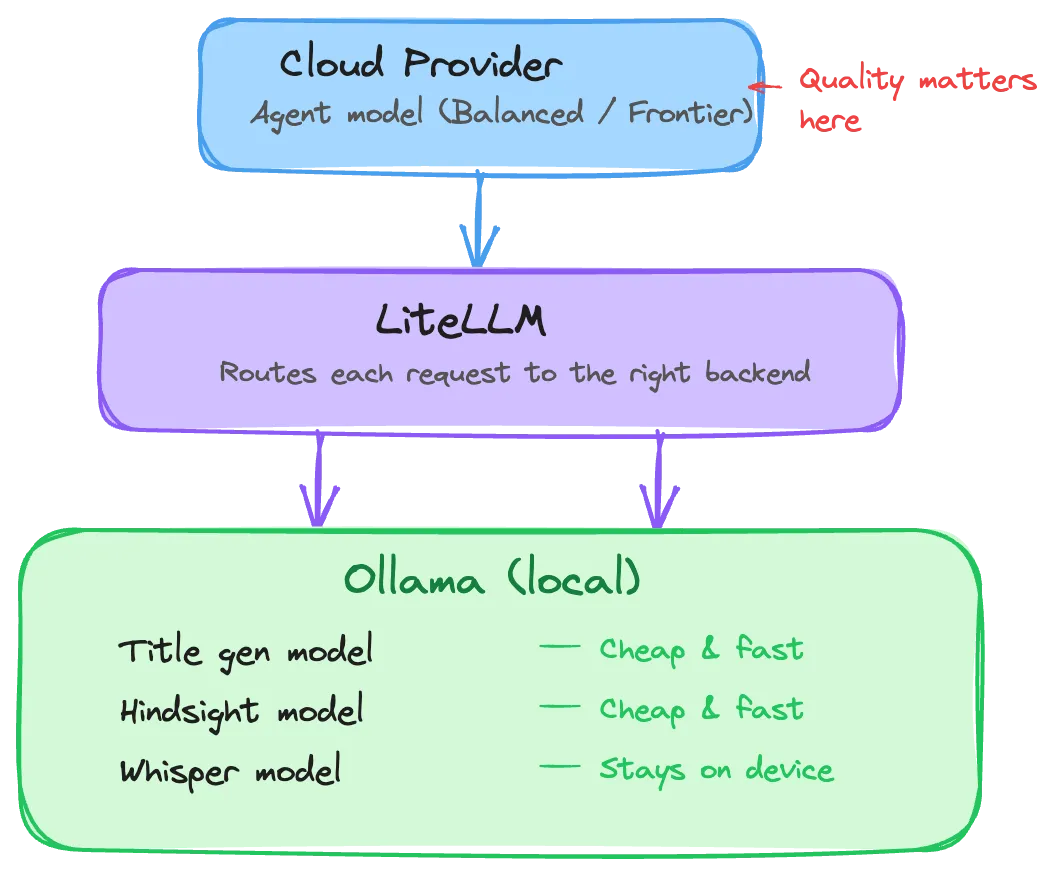
This gives you:
- Privacy where it matters. Your voice recordings and memory data never leave your machine.
- Low cost for simple tasks. Title generation and memory operations run locally at no per-token cost.
- High quality for the agent. The agent — where capability matters most — uses a capable cloud model.
- Simplicity. LiteLLM routes requests to the right backend automatically. Errand does not know or care which models are local and which are cloud-hosted.
Configuration Tips
Section titled “Configuration Tips”Increase the LLM Timeout
Section titled “Increase the LLM Timeout”Local models, especially larger ones, can take longer to load into memory and generate responses. The default LLM timeout of 30 seconds may not be enough.
Go to Settings > Task Management and increase the LLM Timeout to at least 120 seconds for local models. If you see timeout errors, increase it further. See the Task Management documentation for details.
Quantisation
Section titled “Quantisation”Most local model tools support quantised versions of models — smaller, faster files that trade a small amount of quality for significantly reduced memory requirements. For example, a 70B model in 4-bit quantisation needs roughly half the VRAM of the full-precision version.
For Errand’s Efficient-tier tasks (title generation, Hindsight), quantised models work extremely well. For the agent model, use the least aggressive quantisation your hardware can handle to preserve tool-calling reliability.
Model Loading Time
Section titled “Model Loading Time”The first request to a local model may take significantly longer as the model loads into GPU memory. Subsequent requests are fast. If you notice long delays on the first task after starting your system, this is normal — the model is warming up.